Landscape & wallpaper
Free AI Image Generator — No Sign Up Required
A free AI image generator that turns text into pictures. Create social posts, wallpapers and illustrations online, with no sign-up required.
- Free generations
- No account needed
- No daily credits
Your image will appear here
Write a prompt, choose a format, complete verification, and start generating.
Made with GenFree
AI Image Examples & Prompts
Explore six real results from our AI image generator. Pick a use case, reuse the original prompt and ratio, or change the subject to make it your own.
Phone wallpaper
A world with two moons
9:16Product concept
A little afternoon light
3:4Story illustration
One more chapter
1:1Social media
Neon after dark
4:3Character illustration
The greenhouse helper
1:1Create without the setup
Why Choose GenFree’s Free AI Image Generator?
GenFree lets you generate pictures for free, choose from five aspect ratios and download the original file. You can start without registration or a daily credit allowance.
Free, Without Daily Credits
Try an idea, adjust it and generate again without buying credits or a subscription. Our free AI image generator has no daily credit balance to manage. Human verification and brief request protection help keep the service available.
No Sign-Up Required
Use the AI image generator without an account, email address or payment details. Start with your description and download your result from the same page.
Five Aspect Ratios
Choose square, portrait or landscape before you generate. Frame a phone wallpaper differently from a wide banner, and check the actual pixel dimensions beside your finished image.
Generate and Download
Open the full-size preview and save the original image file. Your previous result stays available while you try another version, so you can keep a useful draft before moving on.
From idea to image
How to Use the GenFree AI Image Generator
Three steps from text to image. Start with your own description or reuse a gallery example; the AI image generator uses the same simple controls either way.
- 01
Describe the picture
Describe the subject and its action, then add a setting, style and lighting. Plain language works; no special commands or design experience are needed. Prompts can contain up to 2,000 characters.
- 02
Choose a shape & generate
Select an aspect ratio, complete the human check and choose Generate free image. Keep the page open. Your result appears beside the form on desktop and below it on your phone.
- 03
Save it or try another idea
Open the preview, inspect the details and download your image. Edit the prompt or ratio to try another version. Your previous result stays available until the next image is ready.
Find your next project
What Can You Create with GenFree?
Create social media visuals, desktop and phone wallpapers, product concepts and story illustrations with our AI image generator. Choose an example below to start with a prompt and suggested ratio.
Social Media Images
Create post illustrations, cover ideas and video thumbnails. Start with the neon car example, then describe your own subject and leave room for a caption you can add in an editor.
Suggested ratios: 1:1 · 4:3 · 16:9
Desktop & Phone Wallpapers
Turn a quiet landscape or an imaginary world into a background. Use 16:9 for a wide desktop scene or 9:16 for a phone, keeping the main subject clear of space needed for icons.
Suggested ratios: 16:9 · 9:16
Product Concepts
Explore lighting, materials and backgrounds before planning a shoot. This AI image generator can help sketch a visual direction; use the perfume example as a starting point, rather than an exact representation of an existing product.
Suggested ratios: 3:4 · 1:1
Story Illustrations
Draft a scene, a character idea or a picture-book mood. Try the watercolor fox or describe a new setting. Review each result before combining images into a story; character details can vary between generations.
Suggested ratios: 1:1 · 4:3
Choose the ratio before generating. Check the actual pixel dimensions beside your result; its proportions can differ slightly from the selected ratio.
Make the prompt your own
How to Write Better AI Image Prompts
Give the AI image generator a clear subject, style and setting. This comparison uses the same model and 16:9 ratio with two different prompts; each picture is one generation.
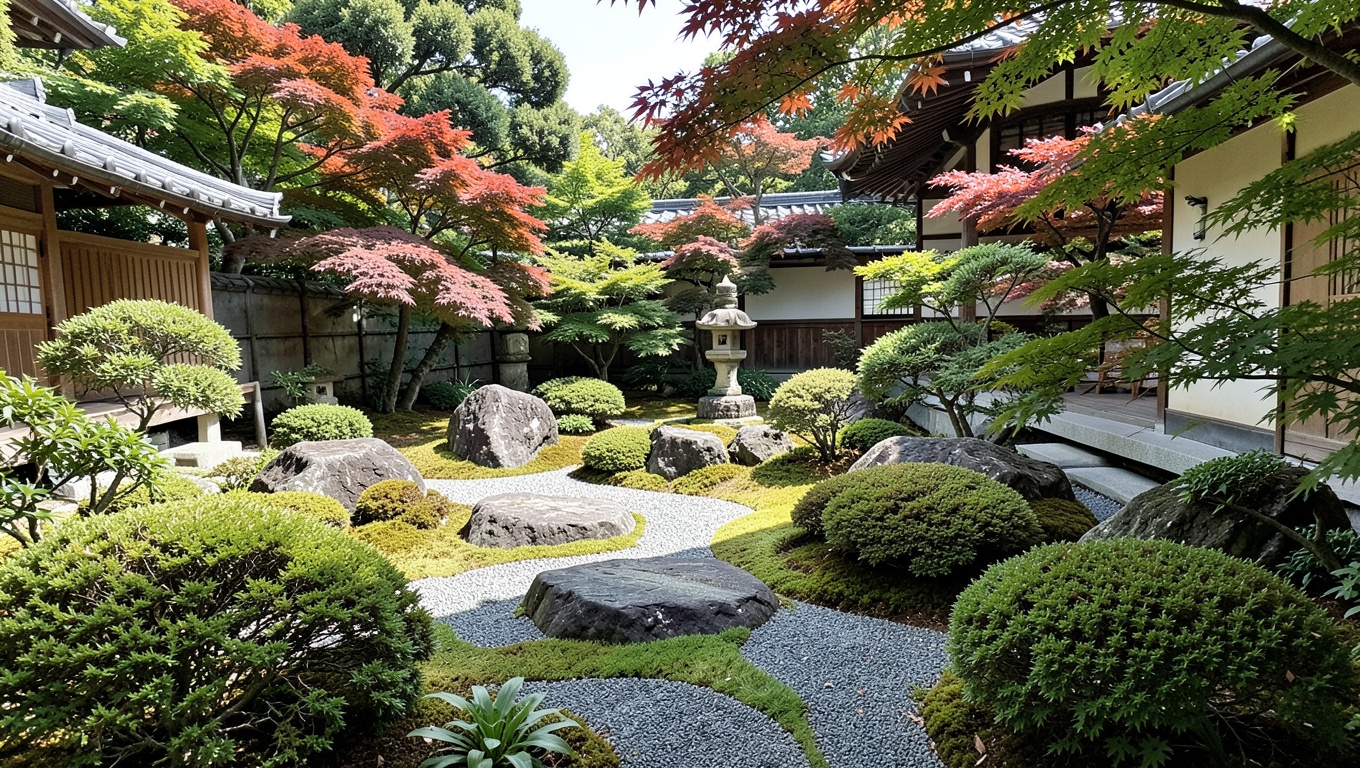
Start with a subject
A Japanese garden.
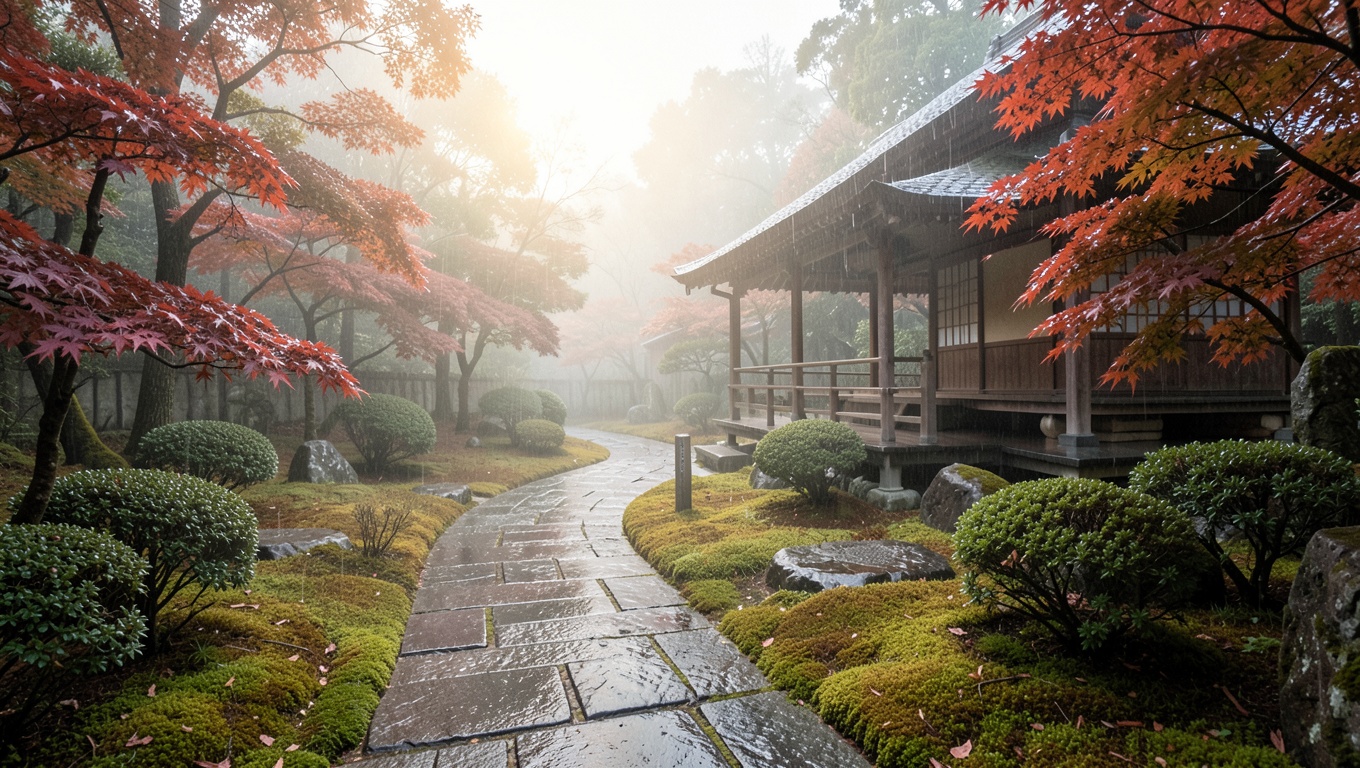
Add a scene, light & composition
A quiet Japanese tea garden after rain, a curved wet stone path leading to a wooden tea house, red maple leaves and soft moss, warm morning light through mist, natural landscape photography, wide composition, no text.
The detailed prompt adds a wet path, a tea house and morning light. Add details that matter to your idea; a longer prompt alone does not guarantee a better result.
Be specific about the subject
Name a subject and an action: “a small orange fox reading a book” gives more direction than “an animal.” Add a setting when it matters.
Choose a visual language
Try watercolor, photography or handmade clay, then name the light or viewpoint. Writing “4K” does not change the downloaded dimensions.
Change one thing at a time
Keep the subject and change one detail between attempts. Inspect text, hands and small details before using the result.
Before you start
Frequently Asked Questions
Practical answers about the current GenFree image generator.
GenFree is a free AI image generator from text. Describe a picture, choose an aspect ratio and generate it in your browser. Use it to explore illustrations, wallpapers, social images and early visual concepts without creating an account.
Yes. The current tool is free, with no daily credit allowance or subscription. Human verification and protection against rapid repeated requests help keep it available. If asked to wait, pause briefly and try again.
No account, email address or payment details are needed to generate, preview or download. Human verification is separate from registration and may be required again for your next image.
GenFree uses FLUX.2 Klein through Runware for new images. The six examples above were previously generated with FLUX.2 Klein through Lyceum. There is one default model. Describe the style you want in your prompt and select an aspect ratio.
Choose from five aspect ratios. Downloads keep the original file returned by the model, with its actual dimensions shown beside the preview. The extension matches the returned format, such as JPG, PNG or WebP.
Generation time depends on service response and load; keep this tab open while the elapsed timer runs. If a request fails, your prompt stays in place. Follow the message, complete verification again if requested and retry. For a failed download, retry while the image is still available or check the full-size preview.
There is no account library, and your results are not added to the example gallery. Download before leaving or refreshing. Our provider handles generation and delivery; the Privacy Policy explains data processing and operational logs.
Review the image for your intended use. Free generation does not establish rights to any depicted brands or characters. Check relevant permissions and the Terms of Service; the image itself is not a licensing guarantee.